AWS KMS — Encrypting a DynamoDB Database
Created a customer-managed KMS key, used it to encrypt a DynamoDB table at rest, then proved the control works: an IAM user without kms:Decrypt is blocked from reading the data until the key policy explicitly grants access.
- Problem
- AWS-owned keys gave the account no say over who could decrypt the table.
- AWS services
- KMSDynamoDBIAM
- Result
- Unauthorised reads blocked until the key policy explicitly granted five actions.
Architecture
- Step 1: An authorised user writes and reads items as normal.
- Step 2: DynamoDB uses the customer-managed key, so the business controls rotation, policy and revocation.
- Step 3: A user with DynamoDB access but no kms:Decrypt is blocked. The table is unreadable to them.
- Step 4: Access returns only after the key policy grants Encrypt, Decrypt, ReEncrypt*, GenerateDataKey* and DescribeKey.
- Key control and revocation
- Customer-managed
- Unauthorised read blocked
- Access denied
- Granted by explicit key policy
- 5 actions
Why it matters
Gives the business direct control over who can decrypt its data, rather than relying on provider-owned keys. The test proved unauthorised reads fail and that approved access is limited to five explicit cryptographic actions.
The problem in detail
DynamoDB encrypts data by default with an AWS-owned key, which means the account has no control over who can decrypt it and no way to revoke access. Sensitive records need a key the business controls, with access provable and removable.
What I built
- 01
Compared AWS-owned, AWS-managed and customer-managed keys, and chose a customer-managed key for full control over rotation, policy and revocation.
- 02
Created a symmetric encrypt/decrypt KMS key with the alias project-kms-key.
- 03
Switched the DynamoDB table's encryption-at-rest setting from the default to the customer-managed key ARN.
- 04
Added an item to the table and read it back to confirm the encrypted table still works normally for authorised callers.
- 05
Created a separate IAM test user with DynamoDB access but no KMS permissions.
- 06
Attempted a table scan as that user and captured the resulting Access denied to kms:Decrypt error — the table was effectively invisible.
- 07
Edited the KMS key policy to allow the named principals kms:Encrypt, kms:Decrypt, kms:ReEncrypt*, kms:GenerateDataKey* and kms:DescribeKey.
- 08
Re-ran the scan to confirm access was restored only after the explicit key-policy grant.
Evidence
01 / 05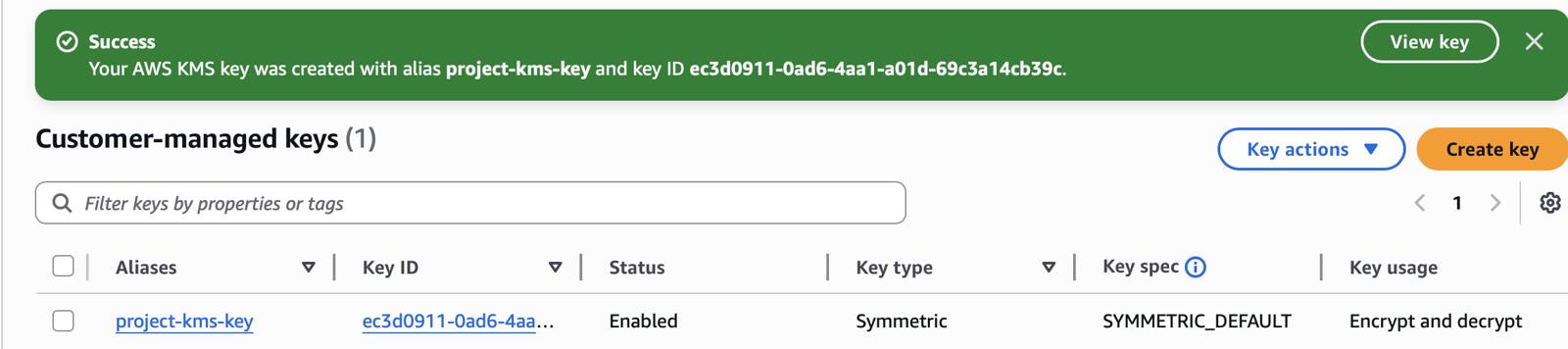
Stage 01 — the customer-managed symmetric key project-kms-key created and enabled for encrypt and decrypt.