Terraform — EC2 Deployment with Cloud-Init
Provisioned an AWS EC2 instance through Terraform with an external cloud-init YAML file passed via user_data, automatically installing and enabling NGINX on first boot so the server reaches a working public endpoint with no manual SSH steps.
- Problem
- Manual server setup over SSH was slow and drifted between builds.
- Services & tools
- TerraformEC2cloud-initNGINX
- Result
- Each instance boots straight into a working NGINX endpoint, identical on every run.
Architecture
- Step 1: Clean separation: main.tf, variables.tf, outputs.tf and an external cloud-init.yaml.
- Step 2: A data source fetches the latest Amazon Linux 2023 AMI. No hardcoded AMI IDs.
- Step 3: Terraform launches the instance with cloud-init passed in through user_data.
- Step 4: On first boot cloud-init updates packages, installs NGINX and enables the service.
- Step 5: The public IP is printed as an output and serves the page on port 80.
- Server configured on boot
- 0 manual steps
- From apply to live endpoint
- Minutes
- Identical instance every run
- Repeatable
Why it matters
Every instance boots into the same predictable state, so a new environment takes minutes instead of hours of manual setup, and there is no drift to slow down incident response.
The problem in detail
Traditional server deployment means launching an instance, logging in over SSH, running package updates, installing the web server, starting the service and verifying it — a sequence that is slow, inconsistent and easy to get wrong. The task was to automate that entire flow: use Terraform to launch a t3.micro EC2 instance, pass a cloud-init script through user_data, and have NGINX running and reachable on a public IP as soon as the instance boots.
What I built
- 01
Structured the project with clear separation of concerns — main.tf for resources, variables.tf for inputs, outputs.tf for returned metadata and cloud-init.yaml for OS-level configuration.
- 02
Used an AWS data source to dynamically fetch the latest Amazon Linux 2023 AMI, avoiding brittle hardcoded AMI IDs that break as images age out.
- 03
Created a cloud-init YAML file that updates system packages, installs NGINX, enables the service on boot and writes a custom deployment verification message to the web root.
- 04
Passed the cloud-init script into the EC2 resource via Terraform's file() function through the user_data argument, keeping the bootstrap logic external and version-controllable.
- 05
Declared explicit outputs for the instance public IP, instance ID, availability zone and instance type so the endpoint is printed automatically after every apply.
- 06
Configured a dedicated security group allowing inbound HTTP (port 80) for the web server and SSH (port 22) for management, with all other traffic denied by default.
- 07
Ran terraform apply to provision the infrastructure, then verified the deployment by checking the running NGINX service over SSH and loading the default welcome page over the public IP.
Evidence
01 / 05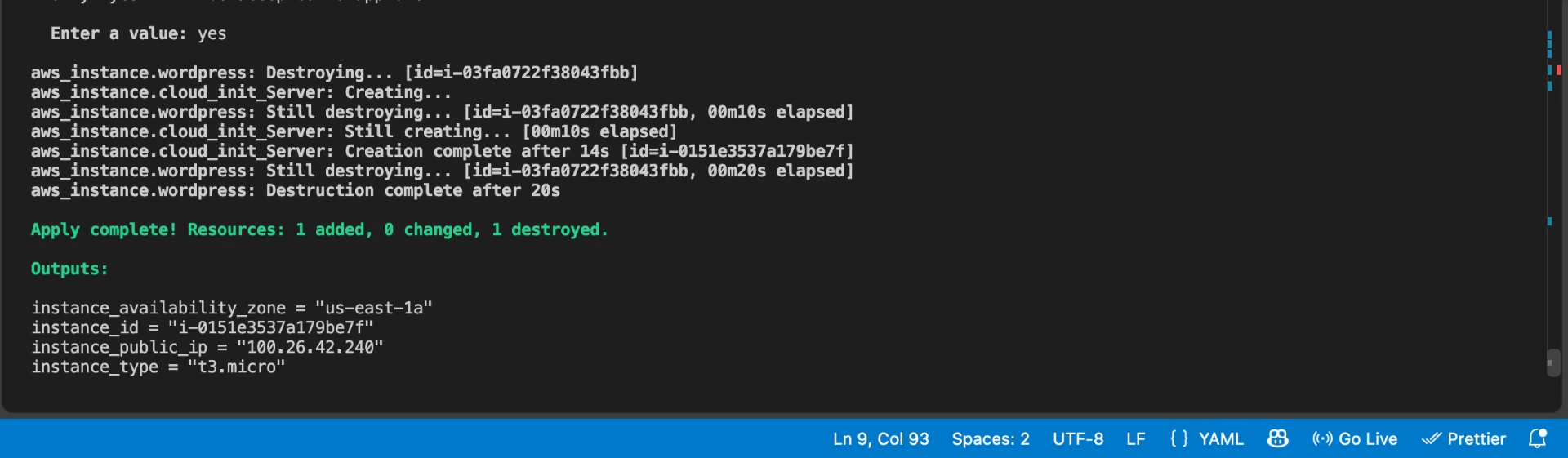
Stage 01 — terraform apply completing the EC2 provisioning cycle, with outputs.tf exposing the instance public IP, ID, availability zone and type.